How it works

News stories are selected from local newspapers such as The Portsmouth News and Hayling Herald by a team of editors and researchers for stories of local interest. Producers arrange the articles into audio scripts which are recorded in our purpose-designed recording suite in East Street, Havant.

The readers’ group has one presenter and three readers of alternating gender for each edition so that there is a clear voice break between articles. Everyone taking part in a recording session is named in the introduction by the presenter. Our recording sessions take place on Tuesday evenings.

The distribution team comes in the next day to duplicate the master memory stick. The recorded media is put into a blue ‘Articles for the Blind’ pouch, according to the listeners’ preference and labelled. The pouches are delivered by post later in the week. When a listener has finished with the media, they return it in the pouch with their address label changed to HTN and post it back to us. No postage is required.

The latest recording is available on the Talking News Federation website.
Our Recordings
Earlier recordings have been archived in date order, with the latest recording at the top of the list. Select a folder with the date you wish to hear. Hover the mouse over the zip file name, eg 762.zip, select the download icon,  and the recording will transfer to your computer, tablet or smart phone. Open the zip file and move the files to the home screen or separate folder. Use a media player to hear the recording.
How to download and play the Talking News
Use a Media Player to play the Talking News. Media Player has been a standard app with Windows for years. There are similar apps available for tablets and phones. Here is an example of how to play the latest Talking News for a Windows PC. There’s a similar process for Apple products and phones.
- Download the latest version of the Talking News as outlined above and it’ll be saved as a ZIP file in the downloads folder.
- Create a new folder on the desktop, either leave the default name of New Folder or add your own name
- Double click the ZIP file and it’ll open showing a number of MP3 files.
- Select all the files by pressing Ctrl and A and drag them into the new folder you’ve created on the desktop.
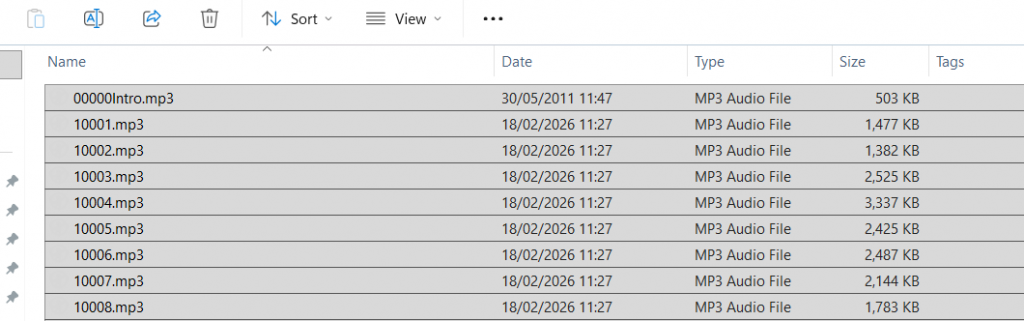
- As an example, below is a list of all the files in Windows Explorer extracted from the latest Talking News ZIP file. Select them all, as shown in light grey, by press Ctrl A together.
- Hover the mouse over the light grey selection, right click and select Open or Open With and pick the media player installed on your PC. The files will load into the media player. Press Play